BinEye 2.0: Numbers, Now With a Calculator
A year ago I introduced the complete rewrite of BinEye, my integer and color analysis tool, rebuilt with modern web technologies for Windows, macOS, Linux and the browser. BinEye 2.0 is out now, and it is the biggest release since that rewrite.
What’s New in 2.0
🔹 Calculator Sheets
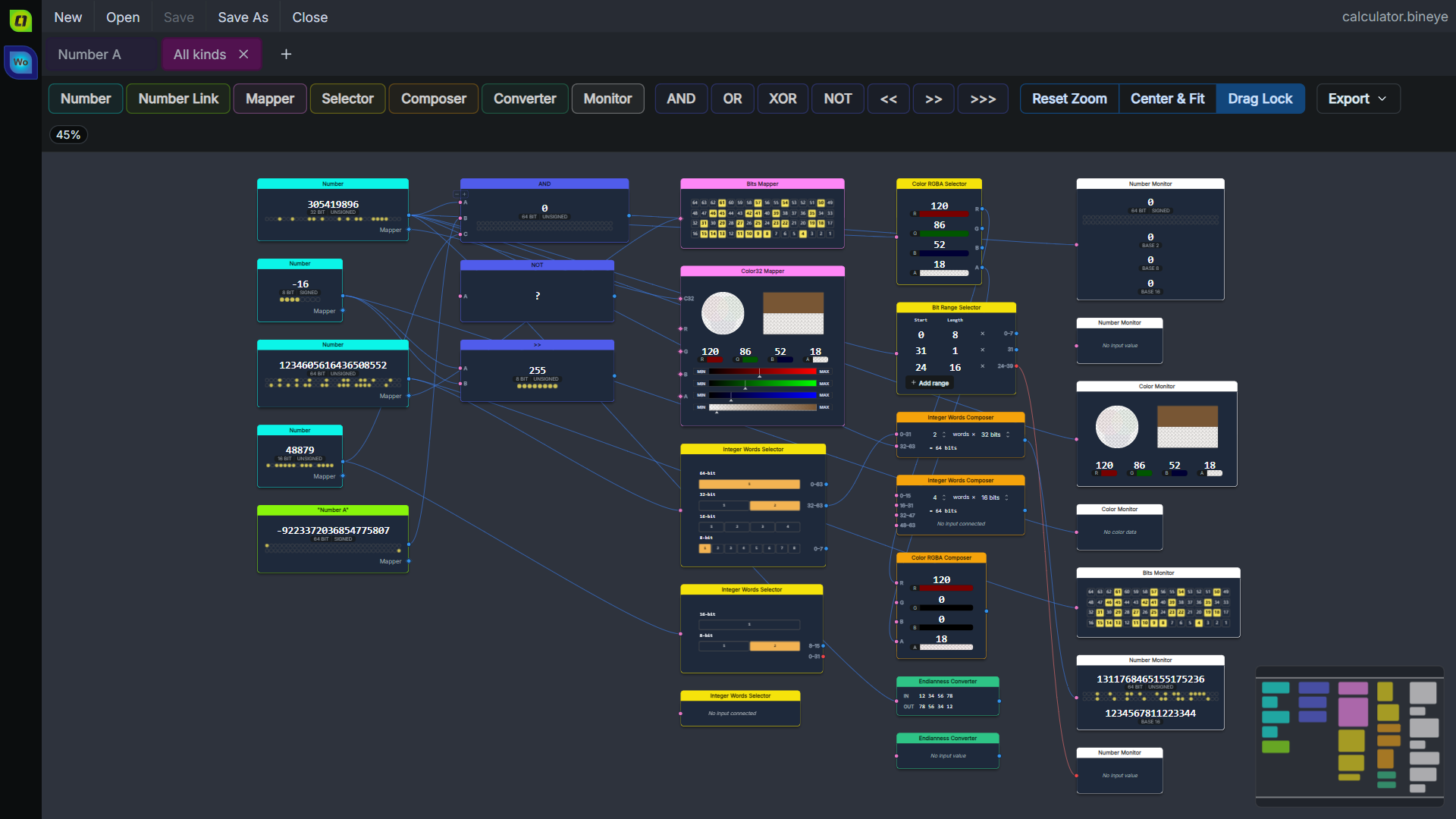
The headline feature. Next to its number sheets, a document can now hold calculator sheets: connect nodes on a canvas and BinEye computes values from other values.
- Numbers and operations: AND, OR, XOR, NOT and the shifts (
<<,>>,>>>) - Selectors that take words, bit ranges or RGBA channels out of a value
- Composers that build a value from words or color channels
- An endianness converter and mappers for bits and 32-bit colors
- Monitors that show any value as a number, bits or a color
Every result updates as you edit the inputs, and a minimap keeps big graphs navigable.
🔹 Export
A calculator sheet exports as SVG or PNG, laid out exactly as it is on screen, ready for notes, documentation and posts.
🔹 The Web App Installs, and Works Offline
BinEye Online is now an installable app (PWA): from Chrome or Edge, Safari’s Add to Dock, or the iPhone home screen. Once loaded it works offline, and a new version announces itself with a Reload button.
🔹 Quality of Life
- Your session, the document, its sheets and your settings, is kept between runs (desktop)
- Copy and paste of values go through the system clipboard
- Documents from 1.x open as before and are upgraded when saved
- Big values open and scroll smoothly: the number sheet draws only the blocks in view
🔹 Platforms
- Native Apple Silicon builds; macOS 12 Monterey or newer
- The Linux AppImage runs on Ubuntu 22.04, Debian 12 and newer
- On Windows, the installer and the portable exe run on a clean Windows 10 or 11, with nothing else to install
- The VS Code extension opens BinEye documents right in the editor, and lists your workspace’s documents in its own view
The Words Tool
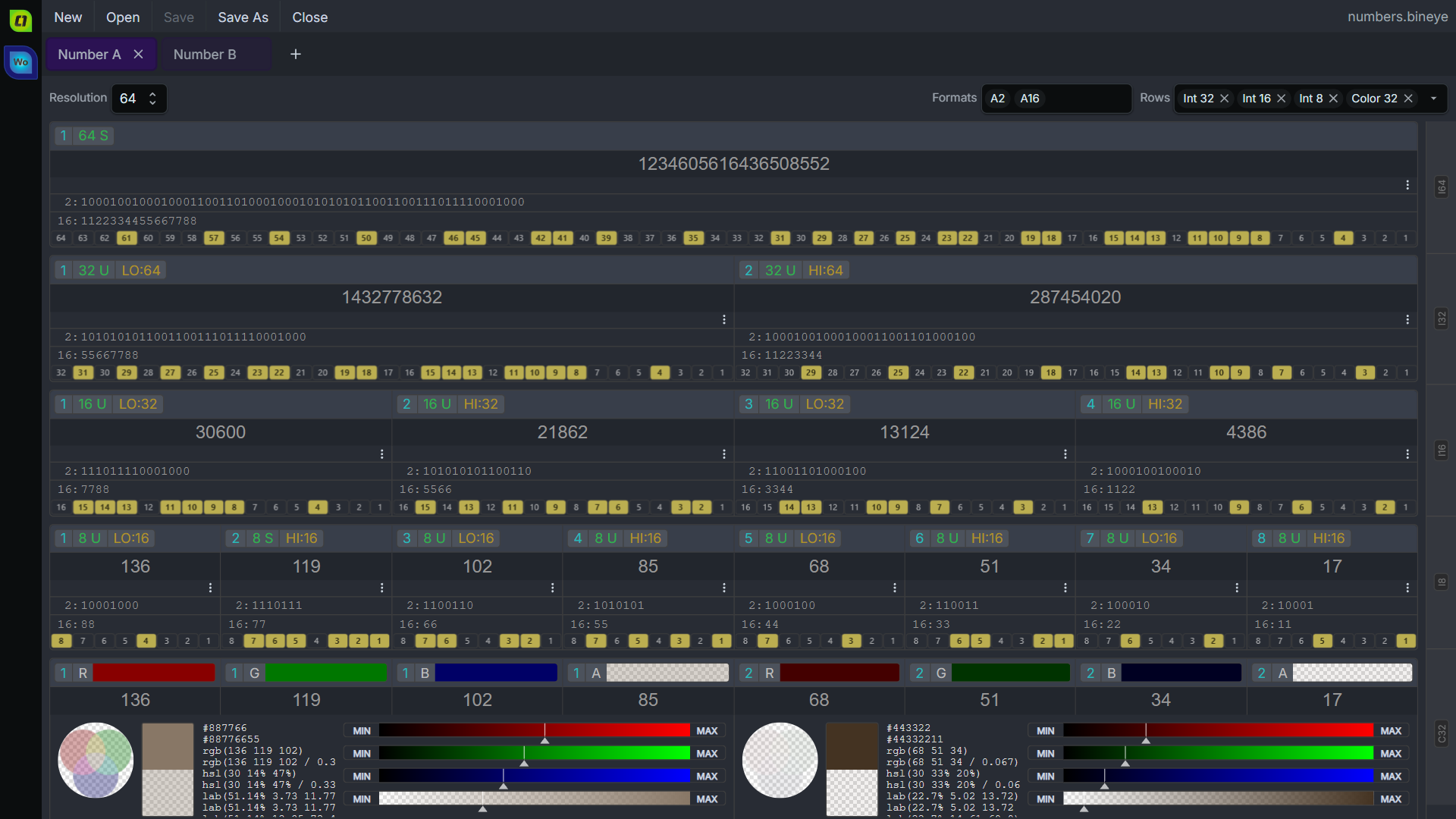
Words is BinEye’s tool for integers, and 2.0 deepens it:
- Integers from 8 up to 1024 bits
- Each value split into words of 8, 16, 32 and 64 bits, signed or unsigned
- Bases from 2 to 64, and float values
- 32-bit words as RGBA colors, with hex, rgb, hsl and lab values
- Calculator sheets and SVG/PNG export
Get BinEye 2.0
Windows
macOS
Linux
Web and VS Code
- BinEye Online: in the browser, or installed as an app
- VS Code Extension, also on Open VSX
The install notes for each platform (the Windows SmartScreen prompt, the macOS first launch, the Linux desktop integration, installing the web app) now live inside BinEye, linked from its welcome screen: Windows, macOS, Linux, Web app, VS Code. Every download can be checked against the release’s SHA256SUMS.
Support and Community
- Discussion, bug reports and ideas: BinEye on Reddit
BinEye is closed source: it is developed in a private repository and doesn’t take outside pull requests. That’s a maintenance choice, not a secret. Feedback is always welcome.
Comments
No comments yet.
Manage a comment you wrote